

font-optimizer: reduce your font weight by 90% in your PHP projects
Today, the vast majority of websites use custom fonts. These fonts are loaded as multiple files on the first visit. Font weight is far from negligible. A font like Roboto loaded in 3 weights can represent 450 KB in TTF.
If you've read my previous article on reducing font weight with subsetting, you already know that techniques exist to reduce fonts like Roboto by more than 90% by combining the compressed WOFF2 format with glyph reduction through subsetting.
What is font-optimizer?
font-optimizer is an open-source PHP package installable via Composer (Packagist) that sets up an optimization workflow for your font files.
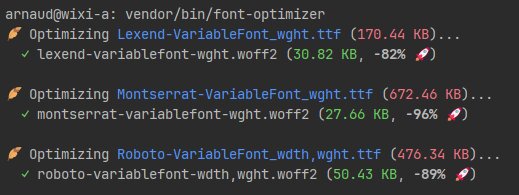
Concretely, font-optimizer adds a command that scans your TTF source files and creates optimized WOFF2 versions in your /public/fonts/ directory (configurable).
By default, it reads files from resources/fonts/ and converts them to WOFF2 while stripping unused characters.
Installing font-optimizer
Install fonttools and brotli:
# Ubuntu / Debian
sudo apt update && sudo apt install -y python3 python3-fonttools python3-brotli

# macOS
brew install python3 && pip3 install fonttools brotli
Install font-optimizer with Composer:
composer require --dev uxcode-fr/font-optimizer
Download your fonts
You can go to Google Fonts to download your favorite fonts.
font-optimizer supports variable fonts.
By default, place your fonts in the resources/fonts/ directory (configurable).
Optimize fonts (up to 96% size reduction)
Run the font-optimizer command from your terminal:
vendor/bin/font-optimizer
Your new fonts are output to the /public/fonts/ directory (configurable).
Load your new font on your site
All that's left is to declare your new font inside the <head></head> tags:
<!-- Preload: the browser downloads the font as soon as the <head> is parsed -->
<link rel="preload" href="/fonts/roboto-variablefont-wdth,wght.woff2" as="font" type="font/woff2" crossorigin>

<style>
    @font-face {
        font-family: 'Lexend';
        src: url('/fonts/roboto-variablefont-wdth,wght.woff2') format('woff2');
        font-weight: 100 900;
        font-style: normal;
        font-display: optional;
    }
</style>
font-optimizer is fully configurable
In a Laravel project, publish the config file with:
php artisan vendor:publish --tag=font-optimizer-config
Here is an example configuration:
<?php

return [
    'source'      => 'resources/fonts',                     // directory containing .ttf source files
    'destination' => 'public/fonts',                        // directory where output files will be saved
    'unicodes'    => 'U+0020-007F,U+00A0-00FF,U+0152-0153', // Unicode ranges to subset
    'features'    => 'kern,liga',                           // OpenType features to preserve
    'flavor'      => 'woff2',                               // output format: woff2 or woff
    'name_ids'    => '*',                                   // name table IDs to keep (* = all)
    'hinting'     => true,                                  // keep hinting instructions
];
Why use this solution?
- Performance: font file sizes reduced by 70 to 90% thanks to WOFF2 format and Unicode subsetting.
- Automation: no more manual CLI commands or online converters.
- Consistency: all developers on your team use the same optimization settings.